
Vava.chat-Video Call&Translate
GoParty TeamSocial
4.7180.00 Reviews
- Version
- 4.7.5
- Installs
- 10.00M
- Age Rating
- Mature 17+
Screenshots
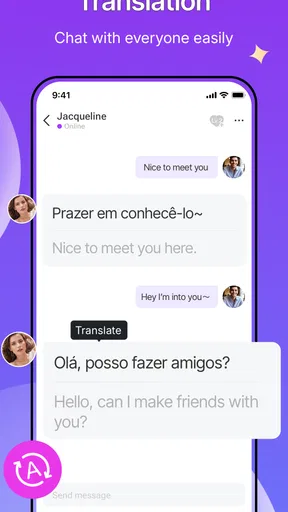
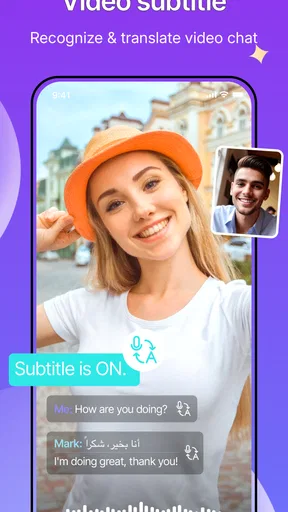
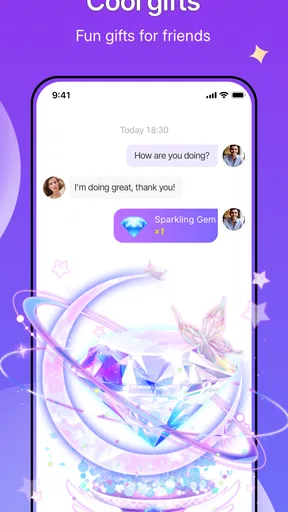
Our Review of Vava.chat-Video Call&Translate
 Analysis by Appyee
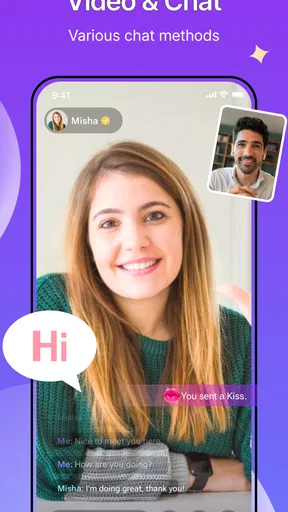
I approached Vava.chat-Video Call&Translate as a social app for people who want a more direct conversation than text messaging allows, especially when language is part of the challenge. Its focus is private one-to-one video calling with real-time translation, so the experience sits somewhere between a casual social network, a video-call tool, and a language bridge. I found that combination interesting because it changes what a conversation can look like: instead of waiting for someone to type, copy a message into a translator, and send it back, both people can try to keep the exchange moving.
The app is free to install, although it includes optional purchases ranging from $0.99 to $203.99 per item. It is published by GoParty Team and is aimed at mature users aged 17 and over. That age guidance matters here because this is a private social environment built around meeting or speaking with other people, not a closed messaging app for family or work. I would treat the social side with the same care I use on any platform where conversations may begin with strangers.
After spending time with its core idea, my opinion is fairly clear: Vava.chat is most useful when translation is the main obstacle to a one-to-one video conversation. It is less compelling if I only need ordinary calls, a formal meeting space, or a carefully controlled community. The accessibility question is similarly nuanced. Translation can make conversation more reachable across languages, but video, audio, small controls, social pressure, and the need to react quickly can still create barriers.
How the interface supports readability and navigation
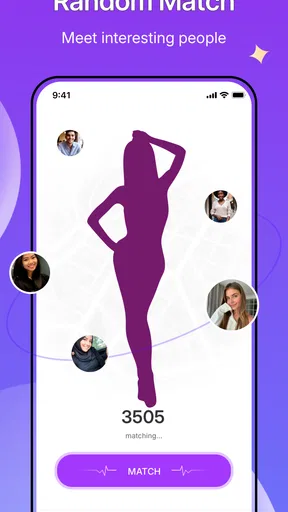
The first thing I look for in a social app is whether I can understand the main action without learning a complicated system. Vava.chat has a straightforward central purpose: find or connect with another person, then use a private video call with translation available during the exchange. That focus is helpful. I do not have to think of it as a large content platform with many unrelated sections, and the one-to-one format makes the intended interaction easier to understand than a busy public feed.
For someone who reads more comfortably than they listen, translation can be more than a novelty. Spoken conversation often disappears as soon as it is said, while translated text gives the user a visual reference during the call. I would still avoid assuming that every translated phrase will be perfectly natural. A translation can preserve the general meaning while losing tone, humor, politeness, or context. The best way to use it is as support for understanding, not as an unquestionable transcript of someone’s intention.
That distinction affects navigation too. When I am concentrating on a conversation, I do not want to hunt through several screens to understand whether translation is active or how to respond. A good workflow is to establish the language situation early: tell the other person which language you prefer, keep sentences reasonably short, and pause after an important point. This reduces the cognitive load for both people and gives the translation process a better chance of keeping up.
The app’s social purpose also means that the clearest interface cannot remove every uncertainty. A user may still wonder who they are about to speak with, how quickly the conversation will move, or whether the other person understands the same translated wording. I recommend taking a moment before starting a longer exchange rather than treating the first call like a race. That small pause is especially useful for people who need extra time to read, process speech, or decide whether to continue.
Vava.chat is available for Android devices running version 7.0 or later, which gives it a broad technical reach across older phones. That is useful for people who cannot or do not want to replace a device simply to join a social service. At the same time, the age of a phone can affect the practical experience through camera quality, microphone performance, battery condition, and general responsiveness. The minimum operating-system requirement tells me the app can support older software, but it does not guarantee the same comfort on every handset.
Why translation changes the reading experience
Real-time translation is most valuable when it reduces the need to switch between apps. In a normal international call, I might listen, stop the conversation, open a translation tool, type or dictate a phrase, return to the call, and then repeat the process. That workflow is tiring and can make the other person feel ignored. Keeping the translation function within the call is a meaningful advantage because it preserves more of the social rhythm.
There is a trade-off, however. A translated conversation may become visually demanding if I am trying to watch facial expressions, listen to pronunciation, read text, and formulate my answer at the same time. For users with dyslexia, attention-related difficulties, slower processing speed, or limited fluency in the conversation language, the app may be easier when used deliberately rather than continuously. I would ask the other person to speak in short sections and allow a little silence between ideas.
Another practical tip is to use the first few minutes as a calibration period. Try simple sentences, confirm names and places, and check that both people interpret key words in the same way. This is more reliable than moving immediately into slang, jokes, technical vocabulary, or emotionally sensitive topics. It also gives a user who needs more time to read a chance to settle into the pace without feeling that they are already falling behind.
Motor, sensory, and communication considerations
Video calling asks more from a user than text chat. I need to position the phone, keep the camera usable, monitor the screen, listen to the other person, and respond socially. That combination can be difficult for someone with limited hand movement, tremors, fatigue, hearing loss, low vision, or sensitivity to visual stimulation. Vava.chat’s private call format may feel less overwhelming than a public room, but it remains an active, real-time interaction.
For motor access, the main benefit is that a one-to-one call can reduce repeated typing. Someone who finds long written messages painful or slow may prefer speaking and letting translation help carry the language burden. The limitation is that a live call leaves less room to pause than asynchronous messaging. If holding a phone is uncomfortable, a stable surface or stand can make a noticeable difference. I would set up the device before connecting rather than trying to adjust it while a new conversation is already underway.
Users with hearing difficulties may find written translation helpful, but I would not treat it as a complete substitute for clear audio. If the other person speaks quickly, has background noise, or uses expressions that translate awkwardly, the visual support may still be hard to follow. A practical approach is to agree on a slower pace and use the text as confirmation rather than relying on it alone. If the main goal is a fully documented written conversation, a conventional text messenger may be the better choice.
For users with low vision, the central issue is not just whether text exists, but whether it can be read comfortably while the call continues. Phone size, system text settings, contrast, and the amount of information on screen will all matter. I would test the app during a calm conversation before depending on it for an important call. If reading the translated content forces me to lose track of the speaker’s face or miss the next sentence, the feature may create as much strain as it removes.
Video itself can be a barrier. Some people communicate more comfortably without being seen, including users with facial differences, body-image concerns, anxiety, or sensory sensitivities. A private video call may feel safer than a public broadcast, but “private” does not automatically mean comfortable. I would not recommend this app to someone who wants a purely audio or text-first social experience unless they have already checked that the available call format suits them.
The mature age rating should guide expectations. I would not present Vava.chat as an app for children, and I would be careful about recommending it to anyone who is especially vulnerable to unwanted contact. A user who needs strong supervision, a tightly managed contact list, or a service designed around known friends may be better served by a family messaging app or a conventional video platform with established contacts.
A realistic everyday use case
Imagine I am planning a trip and need to speak with a local person whose preferred language is different from mine. Texting could work, but it would take several rounds to clarify a meeting point, opening time, or transport detail. On Vava.chat, I can use a private video conversation, show the relevant location if needed, and use translation to reduce the language gap. I would keep the exchange focused, repeat the final details, and confirm them in writing afterward if the information is important.
That scenario shows where the app has genuine value, but it also shows why I would not rely on it blindly. A translation mistake about a street, date, or number could cause real trouble. For travel arrangements, medical information, financial matters, or anything legally significant, I would verify the result through a trusted source. The app can make the first conversation possible; it should not be the only safeguard when precision matters.
Situational access beyond language
Vava.chat can also help in situations where a person is temporarily unable to communicate normally. If I am in a noisy place, translation text may help me catch the gist of a conversation. If I am tired of typing, speaking may feel more natural. If I am trying to practice a language with someone abroad, the call format can make the exchange feel more human than a sequence of isolated messages.
Still, situational access depends heavily on the surroundings. A weak connection, poor lighting, a crowded room, or a low battery can make video calling frustrating. The app’s concept is strongest when I have enough privacy to concentrate and enough time to correct misunderstandings. It is a weaker choice for a rushed call from a train station, a loud workplace, or a place where I cannot comfortably speak on camera.
One of my favorite practical adjustments is to separate the social goal from the technical goal. At the start of a call, I would explain that I may pause to read the translation or ask for a phrase to be repeated. That sets a respectful expectation and helps users who need more processing time. It also prevents silence from being mistaken for disinterest. This is a small communication habit, but it makes a real difference in a tool built around live interaction.
Remaining barriers and how Vava.chat compares
The biggest remaining barrier is that the app combines several demanding tasks at once: meeting someone socially, managing a video call, crossing a language gap, and making quick judgments about trust. Translation reduces one obstacle but does not solve the others. Someone who feels anxious about strangers, needs a highly predictable routine, or prefers careful written communication may find the format tiring even if the language support works well.
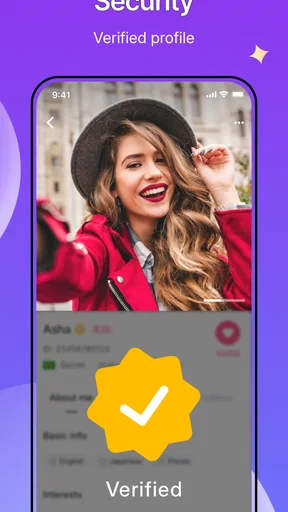
Privacy is another area where I would apply common sense. I would avoid sharing an address, financial details, identification documents, or other sensitive information with a new contact. I would also end a call when the conversation becomes uncomfortable rather than feeling obliged to stay because the app is designed for live interaction. Those are not criticisms of one particular screen; they are sensible boundaries for any service that connects people privately.
Compared with ordinary messaging apps, Vava.chat is more immediate and more personal. Its advantage is the chance to see and hear another person while reducing language friction. Its disadvantage is that messaging gives me more control: I can edit a sentence, translate it separately, answer later, and keep a record of exactly what was written. If accuracy and reflection matter more than spontaneity, text remains the better tool.
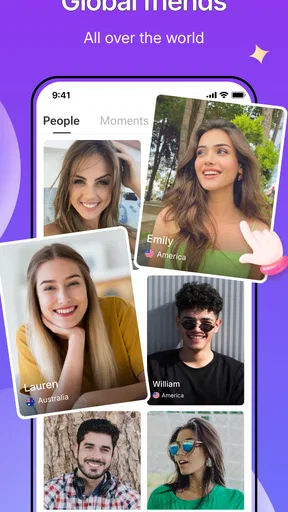
Compared with standard video-call apps, Vava.chat’s distinctive reason to exist is the translation-centered social experience. A familiar meeting platform may be preferable for work, classes, family calls, or scheduled groups because those services are commonly organized around known participants and structured sessions. Vava.chat makes more sense when the purpose is a private conversation with someone local or worldwide and language is part of the reason for choosing the app.
Compared with language-learning platforms, it appears less focused on lessons, exercises, or a planned curriculum and more focused on the conversation itself. That can feel natural for users who learn best through real interaction, but it may disappoint someone expecting teacher guidance or a systematic course. I would use it as a conversational supplement, not as a replacement for formal language study.
The app has reached more than ten million installs and holds a 4.7 average from around eighty thousand ratings, which suggests that its basic proposition resonates with a substantial audience. I treat those figures as context rather than proof that every user will have the same experience. Social apps can feel very different depending on the people encountered, the phone used, the languages involved, and the user’s tolerance for live conversation.
Its current version is 4.7.5, and the app was released on April 1, 2021. I mention the version because keeping an app updated is particularly sensible when it handles live communication and translation. I would also review purchase prompts carefully. The app is free, but optional in-app items can become expensive at the upper end, so I would not assume that every social or translation-related experience is included without cost.
Who should try it, and who should skip it
I would recommend Vava.chat to an adult who wants private one-to-one conversations, enjoys meeting people from different places, and sees translation as a practical aid rather than a perfect interpreter. It is especially interesting for travelers, internationally curious users, language learners, and people who find speaking easier than composing long messages. It can also help someone test whether a cross-language friendship is worth developing before investing time in a more elaborate communication setup.
I would skip it if I needed a professional meeting tool, a child-friendly social environment, a fully asynchronous workflow, or guaranteed precision for important information. I would also hesitate if video makes me uncomfortable or if I need a platform with a very controlled list of known contacts. In those cases, a standard messenger, a conventional video service, or a structured language-learning product would better match the job.
Before committing to regular use, I would prepare three habits: start with low-stakes conversation, agree on a slower pace when translation is involved, and keep personal boundaries firm. I would also test the experience with a trusted person first, paying attention to whether I can read, listen, hold the device, and respond without strain. That short trial reveals more than the app’s social promise because accessibility is personal and depends on the whole situation.
My inclusive verdict
Vava.chat-Video Call&Translate has a clear and worthwhile idea: make private video conversations more possible when two people do not share a comfortable language. I like that it can reduce app-switching and make a live exchange feel less intimidating than it would with manual translation. For the right user, the combination of voice, video, and translated support can turn a conversation that might never begin into one that feels manageable.
Its inclusive value has limits. The app does not remove the physical demands of video calling, the sensory demands of reading and listening at once, or the social risks of speaking with unfamiliar people. Users who need more time, less visual pressure, or a fully written record may need a different workflow. The most accessible approach is often to use Vava.chat selectively: keep calls short at first, explain communication needs openly, and switch to text or another trusted channel when precision or comfort matters more than immediacy.
GoParty Team has built something more focused than a generic social feed, and that focus is its strongest quality. I would recommend giving it a try if translation is genuinely standing between you and a useful conversation. I would not recommend paying for extras before understanding your own usage pattern, and I would never treat the translation feature as a substitute for judgment. Used with realistic expectations, careful boundaries, and a little patience, it can be a friendly bridge between people who otherwise might struggle to communicate.
Verdict
Strengths of Vava.chat-Video Call&Translate
- Real-time translation helps reduce language barriers during video calls.
- Simple interface makes it easy to start chats and manage conversations.
- Supports video communication for more personal, engaging interactions.
- Useful for meeting people from different countries and cultures.
- Convenient chat features complement the video calling experience.
Limitations of Vava.chat-Video Call&Translate
- Translation accuracy may vary with accents, slang, and background noise.
- Video quality depends heavily on both users’ internet connections.
- Meeting strangers online can create privacy and personal-safety concerns.
- Some features or usage limits may require in-app purchases.
- The app may consume significant battery and mobile data during calls.
Similar Picks in This Category
View All
Meta Platforms, Inc.4.6

Instagram4.0

Likee-Live, Chat & Party Games
Likeme Pte. Ltd.4.4

Facebook Lite
Meta Platforms, Inc.4.5

TikTok - Videos, Shop & LIVE
TikTok Pte. Ltd.4.0

Moj: Free Short Drama & Reels
ShareChat4.1
Frequently Asked Questions
What is Vava.chat – Video Call & Translate used for?
Vava.chat – Video Call & Translate is designed for meeting and communicating with people through video calls while reducing language barriers. Its main appeal is the combination of live video interaction and translation features, which can help users chat with people who speak different languages. Before downloading, remember that the available functions may depend on your device, region, account status, and the version of the app installed.
Does Vava.chat provide real-time translation during video calls?
The app is built around video communication with translation support, but the exact translation experience can vary between conversations and supported languages. Translation may depend on audio quality, pronunciation, internet speed, and whether a particular language pair is available. It is best to treat translated text or speech as a helpful aid rather than a perfect replacement for a professional interpreter, especially for sensitive or important conversations.
Is Vava.chat free to download and use?
Vava.chat may be available to download without an upfront charge, but some communication features, premium tools, credits, subscriptions, or in-app services may require payment. The pricing structure can change according to the platform and location, so users should review the app’s store listing and the purchase screen before confirming anything. Also check subscription renewal terms and cancellation instructions to avoid unexpected charges.
Is Vava.chat safe and suitable for all users?
As with any app that connects users through video or messaging, caution is important. Avoid sharing your address, financial details, passwords, private documents, or other sensitive information with people you meet. Use blocking and reporting tools when available, and review the app’s privacy policy to understand how account details, messages, recordings, translations, and device permissions are handled. Parents should also consider whether the service is appropriate for younger users.
What permissions and internet connection does Vava.chat require?
A video calling and translation app generally needs access to the camera and microphone, and it may also request notifications, storage, contacts, or other permissions depending on the features you use. A stable Wi-Fi or mobile-data connection is important for clear video, reliable audio, and faster translation. If calls are unstable, check your signal, close bandwidth-heavy apps, update Vava.chat, and review permission settings in your Android or iOS device.
